MQTT & long range
Hear the whole region, and reach a friend a metro away — without flooding the mesh
LoRa is short-ish range: your radio hears a few kilometres. MQTT is how Meshtastic reaches further — bridging nodes relay traffic over the internet to a shared broker. Perch treats MQTT as a good-citizen tool with two clearly separated modes:
- Observe (read-only, on by choice) — Coop listens to a broker and folds far-away traffic into your map and history. It never publishes.
- Bridge (publish, off by default) — Coop relays your radio's uplink to the broker through the MQTT Client Proxy, so a wi-fi-less radio can reach a friend across town.
Observe a community broker
Coop's MQTT tab ships a picker of community brokers (MeshSTL, Show Me Mesh, Bay Area
Mesh, PugetMesh, Chicagoland, and the public default) plus a slot for any host you like. Pick
one and hit Save & connect — Coop subscribes read-only and decodes what it hears
through the same decrypt/decode/capture pipeline as radio traffic. Observed packets are tagged
via mqtt so you always know what arrived by radio versus internet, and duplicate
copies from multiple gateways are de-duped by packet ID.
Bridge a private channel to a friend
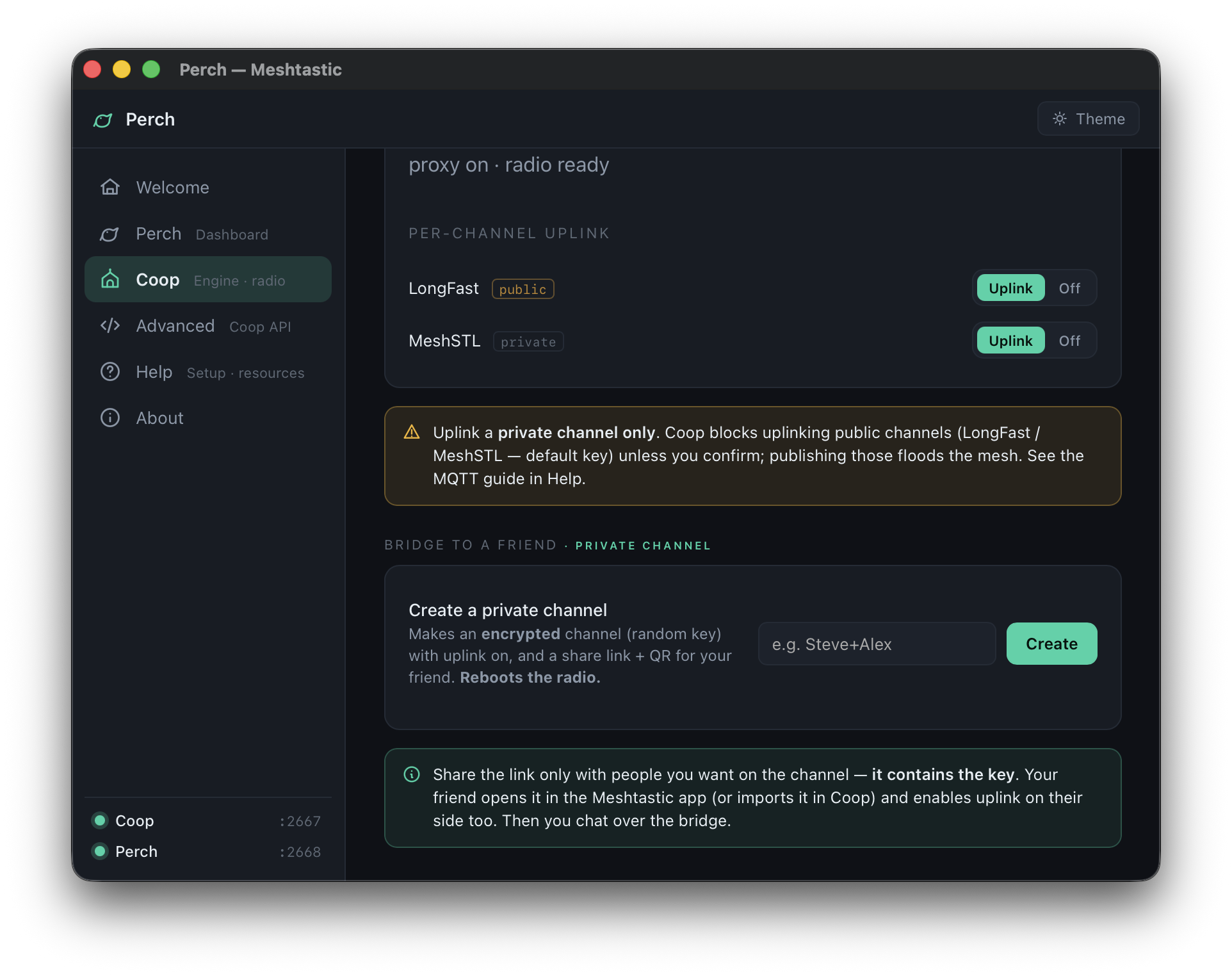
To actually chat with someone far away, you don't uplink a public channel — you make a private, encrypted one and bridge only that. The flow in Coop:
- Turn on Proxy-to-client on the radio. This points the firmware's MQTT at Coop instead of needing wi-fi on the radio; Coop becomes the radio's thin pipe to the broker.
- Create a private channel — Coop generates a random 32-byte key, turns on uplink for it, and hands you a share link + QR. Send it to your friend by link, QR, email or text.
- Your friend joins — they open the link in the Meshtastic app (or import it into their own Coop) and enable uplink on their side too.
- You chat. Messages leave your radio, ride the MQTT Client Proxy over the internet, and arrive on each other's radios — end-to-end encrypted the whole way. The broker only ever sees ciphertext.
published / suppressed counters so you can
see exactly what crossed the bridge.Why the guardrails
A gateway that re-broadcasts everything it hears makes the airwaves worse for everyone nearby and is how people get themselves (rightly) unwelcome on public brokers. Perch is built so contributing is easy and flooding is hard:
- Observe adds nothing; it's the default way to "go long distance".
- Uplink is opt-in, per-channel, private-only-unless-confirmed, and rate-limited.
- Downlink (re-transmitting internet traffic onto your local RF) stays off — you don't become an unsolicited repeater.
- Multiple gateways don't multiply traffic: downstream de-dupes by packet ID, and Perch shows you your own duplicate count.
Headless / env-var configuration
Running Coop on a Pi or server without the app? The observer is configurable by environment variable too (the app writes the same settings):
MESH_MQTT_ENABLED=1 \
MESH_MQTT_HOST=mqtt.example.org  MESH_MQTT_PORT=1883 \
MESH_MQTT_USER=community  MESH_MQTT_PASS=… \
MESH_MQTT_ROOT=msh/US/YourMesh \
coop| Variable | Default | Meaning |
|---|---|---|
MESH_MQTT_ENABLED | off | 1 starts the observer. |
MESH_MQTT_HOST / _PORT | — | Community broker address. |
MESH_MQTT_USER / _PASS | empty | Broker credentials (most community brokers publish read creds). |
MESH_MQTT_ROOT | — | Root topic, e.g. msh/US/MeshSTL. |
MESH_MQTT_CLIENT_ID | perch-observer | How you appear to the broker. |
MESH_MQTT_DEFAULT_PSK | AQ== | Key tried for unnamed/default-key traffic. |
MESH_MQTT_CHANNEL_KEYS | — | JSON of extra keys: {"MyGroup":"base64psk="} — lets the observer decrypt private channels you belong to. |
Health and counters (received / decoded / decrypt-failed, published / suppressed) show on
Coop's status page and in GET /api/mqtt. The bridge is enabled from the app or via
the same config file; see the Coop API reference.
What's public, what's private
- Anything you send on a public channel (LongFast, a community broker's default) is effectively public — tools like meshview mean the whole internet can read it. Assume so.
- Traffic on a private channel is end-to-end encrypted; a broker relaying it only sees ciphertext. Guard the share link — it contains the key.
- Observing never exposes you; only uplink puts your packets on the internet, and only for the channels you turned it on for.